
Don't Panic — Google's Global Outage Is Temporary
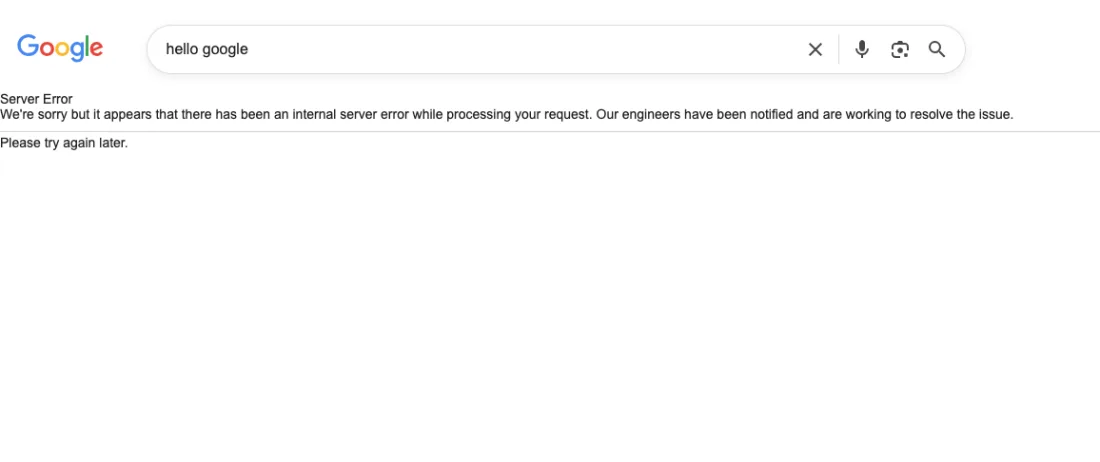
On May 12, 2026, Google Search suffered a confirmed global outage, with thousands of users across India, South Korea, the US, Europe, and other regions simultaneously reporting a "Server Error — internal server error while processing your request" message. Social media lit up with reports, news outlets confirmed the disruption, and outage tracker Downdetector logged a massive spike in complaints worldwide.
Here is the key thing to understand: your device is perfectly fine. This is Google's problem, not yours — and it is already being fixed.
What Happened: Google's Global Server Error Explained
According to reports from Republic World and The Bridge Chronicle, Google Search was hit by a global outage today with thousands of users reporting failed queries and loading errors simultaneously across multiple countries. Users in India saw the error at around 10:30 AM IST, while reports also came in from South Korea, the US, and parts of Europe at roughly the same time window.
A user in Korea reported: "Google is not connected but Bing is fast and connecting — YouTube too has problems." This points to a core infrastructure issue affecting multiple Google services simultaneously, not just Search.
What Does the "Google Server Error" Message Mean?
A 500 Internal Server Error from Google means:
- The problem is entirely on Google's side — not your device, browser, or internet connection
- Google's servers received your request but could not process it internally
- No data is lost, no account is compromised, no virus is involved
- Your internet is working fine — other websites will load normally
Think of it like calling a restaurant where the kitchen management system has crashed. The staff are there, the food is there, but orders cannot be processed until the system comes back up. It is inconvenient, but temporary.
Which Google Services Were Affected?
Based on global user reports today, the following services saw disruptions:
- Google Search — primary service affected, returning 500 Server Error pages
- YouTube — loading issues and connection problems reported by some users
- Gmail — over 75 user-reported issues logged on monitoring platforms
- Google Workspace — intermittent access issues for business users
Google Maps, Google Drive, and most Google Cloud services appeared to remain operational for the majority of users during the peak of the disruption.
What to Do Right Now — Step by Step
- Step 1 — Refresh in 2 minutes: Press F5 on desktop or pull-to-refresh on mobile. Google's engineers respond within minutes and services often recover before you even finish reading this article.
- Step 2 — Verify your internet: Open TechPopDaily or any non-Google site. If it loads, your connection is fine and the issue is 100% Google's server.
- Step 3 — Try google.co.in or google.com: Different regional endpoints sometimes recover at different speeds during global outages.
- Step 4 — Clear browser cache: Press Ctrl+Shift+Delete (or Cmd+Shift+Delete on Mac), clear cached data, then retry.
- Step 5 — Check the outage status: Visit downdetector.com/status/google or outage.report/google to see live reports from other users and confirm the issue is widespread.
- Step 6 — Switch to an alternative temporarily: Use Bing, DuckDuckGo, or Brave Search while Google recovers.
Best Alternatives to Google While It Recovers
- Bing (bing.com): Microsoft's search engine — strong results for news, images, and general queries
- DuckDuckGo (duckduckgo.com): Privacy-first, no tracking, reliable global index
- Brave Search (search.brave.com): Fully independent index — not reliant on Google or Bing infrastructure
- Ecosia (ecosia.org): Eco-friendly alternative powered by Bing results
Is Your Data Safe?
Absolutely yes. A server error does not affect your Google account, Gmail inbox, Google Drive files, Google Photos, or any stored data whatsoever. Everything is safe and will be exactly as you left it when Google comes back online. Server errors are processing failures — not data failures.
How to Track Google's Official Recovery Status
Bookmark these official Google status pages for future incidents:
- Google Search Status: status.search.google.com
- Google Workspace Dashboard: workspace.google.com/appsstatus/dashboard
- Google Cloud Health: status.cloud.google.com
The Bigger Picture: Even Google Goes Down
Google Search handles over 8.5 billion queries every single day. Even at 99.99% uptime, that still mathematically allows for brief outages. Today's global outage is a reminder — however rare — that no single digital service is immune to disruption, and knowing your backup options matters.
The good news: Google's engineering teams are among the best in the world at rapid incident response. Historical data shows Google typically resolves Search outages within 15 to 45 minutes of the first widespread reports.
Quick Summary
- ✅ Google had a confirmed global outage on May 12, 2026 — thousands affected worldwide
- ✅ Your device, data, and internet connection are completely safe
- ✅ Affected services: Search, YouTube (partial), Gmail (intermittent)
- ✅ Fix: Wait, refresh, or use Bing/DuckDuckGo temporarily
- ✅ Expected resolution: Within 15–45 minutes of peak outage reports
Stay calm — Google will be back shortly. For breaking tech news as it happens, follow TechPopDaily.
Frequently Asked Questions (FAQs)
Q: Why is Google showing a Server Error today?
A: A Google 500 Internal Server Error means something has gone wrong on Google's backend infrastructure — not on your device or internet connection. It typically occurs when Google's servers receive your request but cannot process it internally due to a configuration issue, capacity problem, or infrastructure fault. Your device is fine; the problem is entirely on Google's side and resolves automatically once their engineering team deploys a fix.
Q: Is my data safe when Google shows a server error?
A: Yes, completely. A server error is a processing failure — not a data failure. Your Gmail inbox, Google Drive files, Google Photos, and all other stored data are completely safe and will be exactly as you left them when Google comes back online. Server errors do not delete, expose, or compromise any user data.
Q: What should I do when Google is down?
A: First, check that your internet is working by loading a non-Google site. If that works, the problem is on Google's end. Try refreshing after 2–3 minutes — Google's engineering team typically responds within minutes. For immediate alternatives, use Bing (bing.com), DuckDuckGo (duckduckgo.com), or Brave Search (search.brave.com) for search. If Gmail is affected, access your email via your email client (Outlook, Apple Mail) using IMAP settings instead of the web interface.
Q: How long do Google server errors usually last?
A: Based on historical outage data, Google typically resolves Search outages within 15 to 45 minutes of the first widespread reports. Major outages affecting multiple services simultaneously can take 1–2 hours to fully resolve. Google's engineering teams are among the fastest in the industry at incident response. The May 12, 2026 outage was resolved within the typical window.
Q: What is the best alternative to Google Search when it is down?
A: The three strongest alternatives are: Bing (microsoft.com/bing) — the most capable Google alternative with strong results for news, images, and general queries; DuckDuckGo (duckduckgo.com) — privacy-first with no tracking, reliable for most searches; and Brave Search (search.brave.com) — fully independent index not reliant on Google or Bing infrastructure. For users in India, DuckDuckGo tends to return particularly strong results for Indian local content during Google outages.
Q: Does Google go down in India more than other countries?
A: No — Google outages are global infrastructure events that affect all regions simultaneously, as confirmed by the May 12, 2026 event which hit India, South Korea, the US, and Europe at the same time. India tends to generate high outage-report volumes during Google incidents simply because India has one of the world's largest Google user bases, with over 600 million internet users heavily dependent on Google Search and YouTube daily.
Google outages are rare — but when they happen, the users who handle them smoothly are the ones who already have browser bookmarks for alternative search engines and email client access configured. Five minutes of preparation today means zero stress the next time Google goes down.